
Jewelry casting software that runs every job from CAD file to shipment
PIRO Fusion is the production system for casting houses, CAD and prototyping studios and contract manufacturers - job orders, workflows, metal reconciliation, customer approvals and invoicing in one place.
Built with casting companies since 2007
Paper job tickets and spreadsheets stop working the moment volume grows
Quoting takes too long
Every price estimate means back-and-forth email, manual weight and metal calculations, and a quote that is out of date by the time it is sent.
Approvals get lost in email
CAD files, renders and design approvals live in inboxes, so nobody is sure which version was approved or when the customer signed off.
Nobody knows where a job is
Jobs move between CAD, printing, casting, setting and finishing without a shared status, so deadlines slip and customers call for updates.
Metal losses stay invisible
Tree weights, sprues, scrap and returns are reconciled by hand - or not at all - and the real cost of a job is a guess.
Inventory is disconnected from production
Alloys, stones, findings and customer-owned material are tracked separately from the jobs consuming them, so shortages appear mid-production.
Invoicing eats a full-time role
Finished jobs are re-typed into invoices and shipping documents, and accounting gets the same data entered a second time.
PIRO Fusion connects the whole chain - quote, CAD file, job order, production workflow, materials, metal reconciliation, invoicing and shipping - on one jewelry-specific system built around how casting companies actually work.
Casting and service companies around the world run on PIRO
"Prior to implementing PIRO, for years we ran an entirely manual process for tracking jewelry production. We are now able to process more manufacturing jobs and complete more orders faster and on time, and to track more accurate data to make better company decisions."
"We estimate that production errors have been reduced by at least 30% since the adoption of PIRO, and the overall savings and increases in production capacity have allowed us to add more staff and increase production."
"PIRO connects directly to our website through its Customer Portal, allowing customers to check on the status of their job orders on their own, and to QuickBooks, reducing the time spent on data entry."
Read more in customer stories.
The everyday situations a casting company handles all day
These are the moments where casting service companies lose time. PIRO turns each of them into a tracked, repeatable step.
A customer uploads an .stl file and wants a price today
The file arrives by email, someone estimates weight and metal cost by hand, and the quote goes out a day later - if it is not forgotten.
The customer submits the file in the Customer Portal, PIRO estimates the price from weight, metal and service rules, and the quote is ready to approve.
Fifteen jobs go on one casting tree
The tree is written on paper, and after casting nobody can match weights, losses or costs back to the individual jobs.
Multiple job orders are assigned to one tree, and tree weight, yield and loss are distributed back to each job automatically.
A client keeps calling to ask where their order is
Someone walks to the bench, checks the job, and calls back - several times a day, for every client.
Clients follow live job status, approvals and history in the Customer Portal, and automatic emails are sent as jobs move between steps.
A rush job needs to jump the queue
The rush is communicated verbally, gets forgotten at the next station, and a regular job is delayed instead.
Priority, due date and owner are on the job order, and every station sees its own queue in the right order.
Everything a casting company needs, in one system
Quoting, job orders, production, metals, inventory, invoicing and the client portal run on one shared dataset. Start with what you need today and switch on the rest as you grow.
Job orders & production workflows
Your production steps, automated exactly as you run them today.
- ✓Job orders with due dates, priorities and owners
- ✓Configurable workflows for CAD, printing, casting, setting, finishing
- ✓Job splits, conditional routing and required data per step
- ✓Automatic emails and notifications on status change
- ✓Station queues, bottleneck alerts and workload visibility
- ✓Rework, QC and hold steps
Casting & metal management
Trees, weights, yields and losses tracked to the job.
- ✓Multiple jobs per casting tree
- ✓Tree weight, yield and scrap capture
- ✓Metal loss tracking and allocation per job
- ✓Alloy and karat conversion
- ✓Customer-owned metal and stone accounting
- ✓Built-in metal and diamond scale integration
Quoting & price automation
Consistent pricing without manual calculation.
- ✓Automated price estimation from weight, metal and services
- ✓Pricing rules based on live metal prices
- ✓Customer-specific rates and service price lists
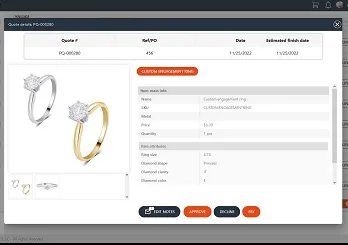
- ✓Quote approval and conversion into a job order
- ✓Quote history per customer
Customer Portal
The number one tool for casting companies.
- ✓.stl and .3dm file upload with the order
- ✓Online custom order and quote requests
- ✓Real-time job order status and history
- ✓Quotation approval and conversion
- ✓Invoices, statements and payment online
- ✓Branded, 24/7 self-service access
Inventory & purchasing
Materials connected to the jobs that consume them.
- ✓Alloys, grain, stones, findings and components
- ✓Multi-location and safe inventory
- ✓Low-stock alerts and reorder points
- ✓Purchase orders, receiving and landed cost
- ✓Customer-owned and vendor-owned material
- ✓Full movement history per item
Invoicing, shipping & finance
From finished job to paid invoice without re-typing.
- ✓Invoices generated from completed jobs
- ✓Shipping rates, labels and tracking numbers
- ✓Deposits, balances and customer statements
- ✓Credit card payments through the portal
- ✓QuickBooks sync without duplicate entry
Users, time & performance
Know who worked on what, and how long it took.
- ✓User assignments and activity tracking
- ✓Time spent per job and per production step
- ✓Operator performance and throughput reporting
- ✓Role-based permissions and audit trail
Reporting & integrations
One dataset, and the numbers your owner actually asks for.
- ✓Job costing and margin per job or customer
- ✓Scheduled reports by email
- ✓Production, inventory and metal reconciliation reports
- ✓QuickBooks, Shopify, TaxJar, shipping and RingCentral
- ✓Open API for custom connections
Your production steps, automated as they are
A job order moves station by station, collecting weights, files, photos and time along the way - so status, costing and customer updates are a by-product of production instead of extra admin.
File checked, quote approved
Wax weight captured
Several jobs on one tree
Tree weight, yield, loss
Sprue removal, cleaning
Stones issued from stock
Rework loop if rejected
Generated from the job
Label and tracking number
The number one tool for casting companies
The Customer Portal is your branded online front door. Clients request quotes, upload CAD files, place custom orders, approve quotations, follow job status in real time and settle invoices - all connected live to your PIRO system, so nothing has to be re-entered.
Explore the Customer Portal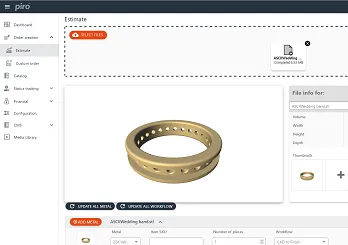

Job order automation
- ✓Create custom orders online
- ✓Upload .stl and .3dm files
- ✓Automated price estimation
- ✓Real-time job order status
- ✓Job order history
- ✓Quotation approval and conversion
Customer self-management
- ✓Manage profile online
- ✓Order and quote history
- ✓View and print invoices
- ✓Card details update
- ✓24/7 access
Sales automation
- ✓Request price quotes
- ✓Online product catalog
- ✓Shopping cart for stock items
- ✓Credit card payments
What casting companies report after moving to PIRO
More jobs with the same team
Users process more orders without adding headcount, because status, routing and paperwork stop consuming production time.
Fewer production errors
Required data at each step, clear specs and approved files remove most of the human error that used to reach the bench.
Deadlines you can commit to
Every job has a due date, a station and an owner, so late jobs surface before the customer notices them.
Transparent metal accounting
Tree weights, yields, scrap and customer metal are reconciled in the system instead of on a notepad.
Quotes out in minutes
Automated estimation from weight, metal and services replaces manual calculation and email back-and-forth.
Better customer service
Clients see their own jobs, approvals and documents 24/7, which cuts status calls and helps retention.
We do not ask you to change your process - we automate the one you have
Our expertise in working with casting companies and the associated best practices are built into the software. Workflows are configured around your production steps, so the system matches your shop floor from day one.
Back-office tools for job tracking
Every job order, station, weight and document in one place for your production team.
An online portal for your clients
Easy order entry, file upload, transparency and traceability without another phone call.
Real-time data and automated invoicing
Reporting, job costing and invoicing that follow production instead of trailing behind it.
See PIRO run your casting workflow
Pick a time and we will walk through a real job - from the file arriving to the invoice going out - using your production steps, not a generic demo script.
What to expect
- ✓45-90 minutes focused on your shop floor
- ✓Bring a typical job, your production steps and your pricing logic
- ✓Leave with a clear scope, timeline and pricing - no pressure
Jewelry casting software questions
What is jewelry casting software?
Jewelry casting software manages the full service workflow of a casting or prototyping company: quotes, CAD file intake, job orders, production steps, casting trees, metal reconciliation, inventory, invoicing and shipping. PIRO Fusion was originally built for casting houses and end-to-end jewelry manufacturers.
We use our own production steps. Are the workflows fixed?
No. PIRO ships with sample workflows, but they are optional. Workflows are configured around your steps, including job splits, conditional routing, automatic notifications and required data before a job moves on.
Can we assign more than one job to a casting tree?
Yes. A tree can carry many job orders, and tree weight, yield and loss are allocated back to each individual job.
How does PIRO track weights and metal losses?
Weights are captured at the production steps you choose - wax, tree, as-cast, finished - and PIRO calculates yield, scrap and loss per job, including customer-owned metal.
Does inventory update automatically during production?
Yes. Materials consumed by a job are deducted as production progresses, so stock in the safe and stock in the system stay aligned without manual adjustment.
Can PIRO warn us when materials run low?
Yes. Reorder points and low-stock alerts trigger purchase orders, and receiving puts the goods straight back into available inventory.
Can customers upload .stl and .3dm files?
Yes. Through the Customer Portal clients submit custom orders with CAD files attached, and those requests arrive in PIRO as quotes or job orders ready to process.
How many clients can use the Customer Portal?
There is no practical limit on portal users. Each account gets its own login, pricing and order history, and access is managed from PIRO.
Does PIRO replace our accounting system?
No. PIRO runs operations and syncs invoices, payments and mapped records with QuickBooks, so accounting stays in your accountant's system.
Can PIRO calculate shipping rates?
Yes. Shipping integrations return live rates, produce labels and store tracking numbers on the order and in the portal.
How long does implementation take?
Most casting implementations run in phases over several weeks, depending on data quality, workflow complexity and integrations. The walkthrough ends with a realistic scope and timeline for your company.
See what happens when quoting, production and invoicing finally share the same system.
Book a walkthrough and we will show PIRO running against your own casting workflow.